PSA Online Appointment | Get Your Civil Registry Certificate
Schedule a PSA appointment and avoid lines. Click the button below and get your PSA online appointment now.

How to Get a PSA Online Appointment?
To get an online PSA appointment, visit the PSA official website, schedule your appointment, and pay the fee. Once the appointment is booked, walk into the PSA outlet and get your documents. Remember, direct PSA walk-in is not allowed. Below is the step-by-step tutorial:
Step 1: Visit PSA Portal (PSA.gov.ph)
- First of all, visit the Philippines Statistics Authority official website (www psa gov ph online appointment) or click the button below for direct access.
- On the homepage, click the “Civil Registration Service Appointment System” button.
- You will then be directed to the PSA appointment registration page, where the complete registration process is explained. Read the information carefully and scroll down to the bottom of the page.
- Next, check the box to confirm that you agree to the terms and conditions.
- Finally, review the important instructions, complete the CAPTCHA verification, and click “Next” to proceed.
Step 2: Choose Purpose & Location
- Select the purpose of your appointment from the drop-down menu, then click “Next” to proceed.
- Choose your region and preferred PSA outlet from the available options.
- The First-Time Job Seeker requirements will appear on the screen. Read the information carefully, then click “Next” to continue.
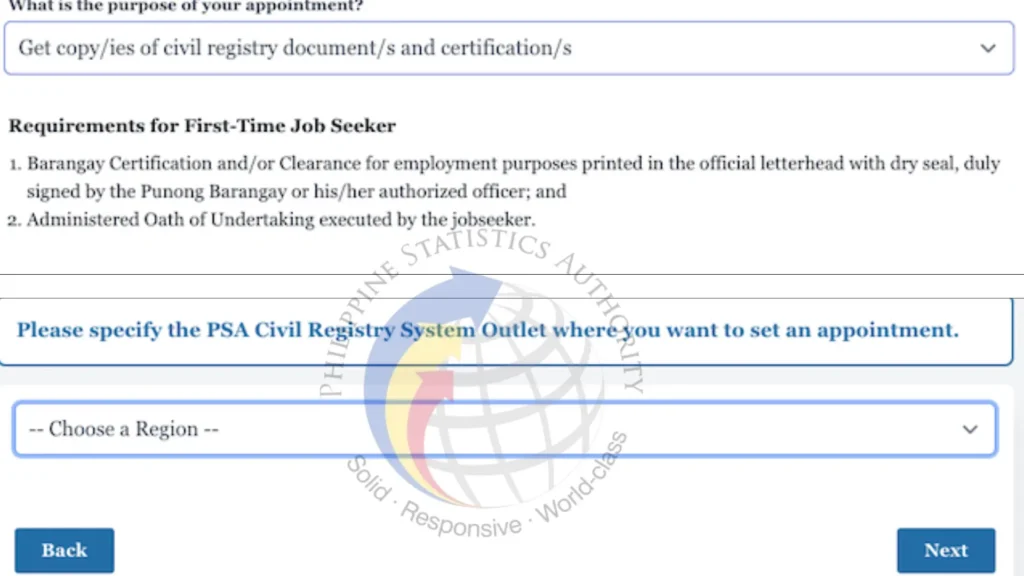
Step 3: Fill the PSA Online Application Form
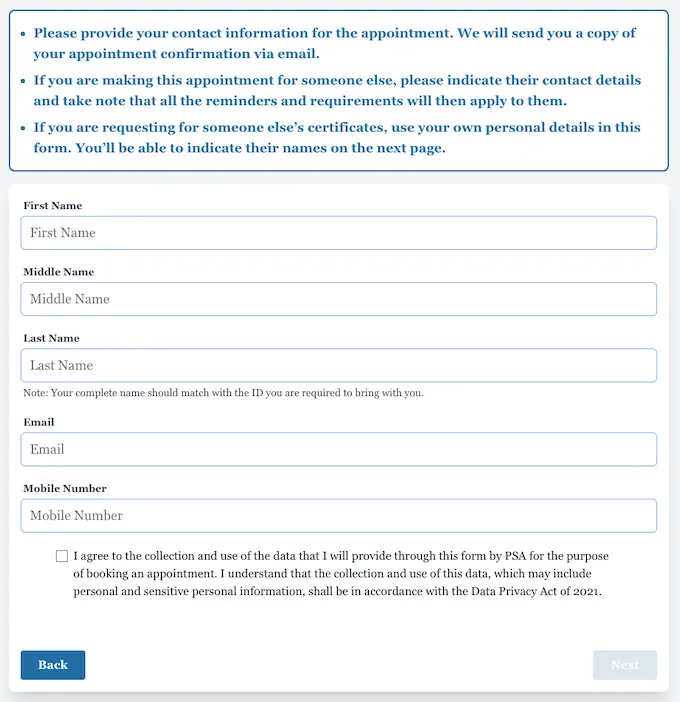
- A registration form will appear on the screen. Fill in all the required information carefully using your official details.
- You will need to provide the following information:
- Full Name
- Email Address
- Mobile Number
- Make sure to enter an active email address and mobile number, as these will be used to send OTP verification codes and important appointment updates.
- After completing the form, tick the box to confirm that you agree to the terms and conditions, then click “Next” to proceed.
4. Verify OTP
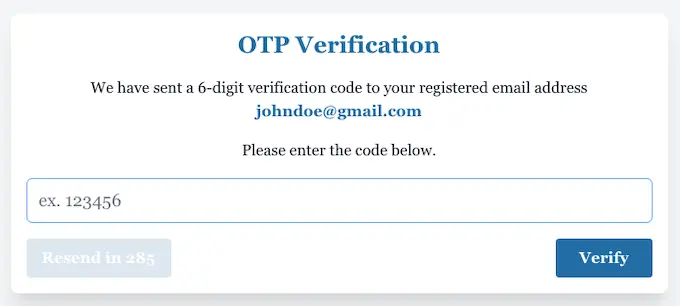
- An OTP will be sent to the provided email address. Copy it and enter it in the required space to complete verification.
- Please note that the OTP remains valid only for 5 minutes. Enter it before it expires.
5. Certificate Details
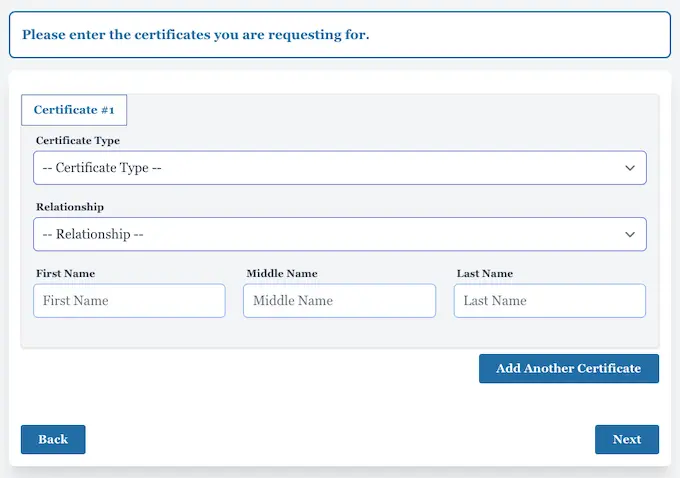
- Now, you will be asked to provide all the certificate details. The required information includes the certificate type, relationship, and full name.
- To add another certificate, simply click “Add Another Certificate” and provide all the required details.
- Click “Next” to continue.
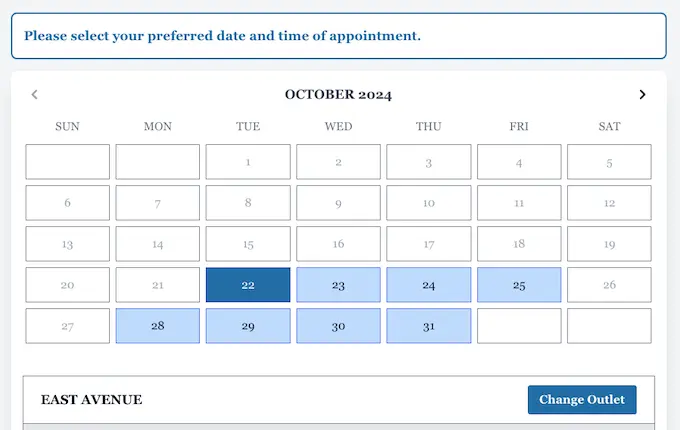
6. Choose Online PSA Appointment Time
- Now select the appointment date and time from the available slots.
- Click the “change outlet” option to change the appointment location.
- Once done, click “next” to move further.
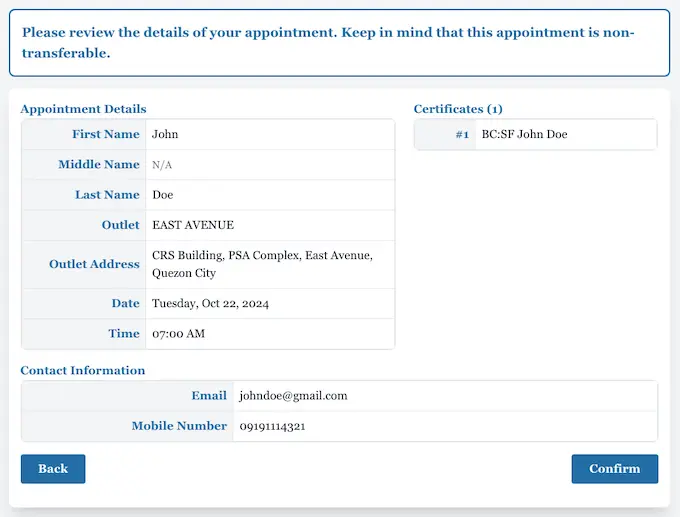
7. Get Appointment Slip
- That is it. Your appointment is now booked. You will get a confirmation slip in your email.
- Save the slip as proof of appointment and bring it with you on the appointment date.
Arrive at your selected PSA Civil Registry System outlet at least a few minutes before your scheduled appointment time. If you are unable to attend on your scheduled date, you can easily reschedule PSA appointment to another available slot.
Before leaving, make sure you have all the required documents, including a completed application form, a valid government-issued ID, and any supporting documents such as an PSA Authorization Letter, Special Power of Attorney (SPA), or Affidavit, if applicable.
Certificates Available At PSA
PSA (Philippine Statistics Authority) provides 5 main civil registry certificates. All serve as official and authenticated proof of identity, citizenship, and civil status. Here’s everything you need to know:
Certificate | Full Name | Fee (Branch) | Fee (Online) | Fee (e-Certificate) |
|---|---|---|---|---|
PSA Birth Certificate | Authenticated Birth Certificate | ₱155 | ₱330 | ₱290 |
PSA Marriage Certificate | Authenticated Marriage Certificate | ₱155 | ₱330 | ₱290 |
PSA Death Certificate | Authenticated Death Certificate | ₱155 | ₱330 | ₱290 |
CENOMAR | Certificate of No Marriage Record | ₱210 | ₱345 | ₱345 |
CENODEATH | Certificate of No Death Record | ₱210 | ₱345 | ₱345 |
PSA Appointment Requirements
Before applying for a PSA certificate, ensure you have the required documents ready to avoid delays or rejected requests. The requirements may vary depending on the certificate type and whether you’re applying for yourself or on someone else’s behalf.
Appointment slip with QR code
This is your proof of booking. PSA staff scan or check the QR code to confirm your schedule and appointment details.
Valid government ID
Bring an original, unexpired government-issued ID with the same name you used when booking your appointment. This helps the PSA verify your identity.
Authorization Letter
If you are not the document owner, bring written proof that you are allowed to request on their behalf. This shows you are an authorized representative.
Application form
You usually get this form at the branch. Fill it out carefully with the correct details before submitting it for processing.
Payment for the certificate fee
After validation, you pay the required fee at the PSA outlet. The amount depends on the type of certificate you are requesting.
Supporting IDs
Some requests need extra proof, such as copies of IDs or relationship documents. Bring them in case PSA asks for verification.
Appointment slip with QR code
This is your proof of booking. PSA staff scan or check the QR code to confirm your schedule and appointment details.
Valid government ID
Bring an original, unexpired government-issued ID with the same name you used when booking your appointment. This helps the PSA verify your identity.
Tips for a Smooth Process
Following a few simple tips can help you book your PSA appointment smoothly and receive your certificate without unnecessary delays, errors, or rejected applications.
- PSA appointment slots can fill up quickly, especially in busy cities. Schedule your appointment as early as possible to secure your preferred date and time.
- Enter your name, email address, and mobile number exactly as they appear on your valid ID. Incorrect details may cause delays or issues with your appointment.
- Before visiting the PSA outlet, prepare all necessary documents, including a valid government-issued ID, your completed application form, and any authorization documents if you are requesting a certificate on someone else’s behalf.
- Reach the PSA Civil Registry System outlet at least 15–30 minutes before your appointment. Arriving early gives you enough time for verification and helps avoid missing your scheduled slot.

Troubleshooting Common Errors
Many applicants encounter minor issues while booking a PSA appointment online. Based on common user experiences and reported problems, the troubleshooting tips below can help you resolve errors quickly and complete your request successfully.
No Slots Available
The appointment slots fill up quickly, mostly on the busy days. Once all the slots are booked, you can not schedule the appointment on that specific date.
OTP Not Received
The OTP issue mostly occurs when you provide the wrong mobile number. It can also occur if your mobile number is inactive.
Wrong Details
Providing wrong details can cause issues in appointment booking as well as in certificate issuance.
Appointment Missed
Don’t panic if you miss your appointment. There is an easy solution for it.
PSA Customer Support
If you need assistance with your PSA appointment or certificate request, you can contact the official PSA support channels below for accurate information, application updates, and technical assistance.
PSA contact number
Contact Number: (02) 8737-1111
Available Mondays to Saturdays
8:00 AM to 5:00 PM
PSA Main Office
Contact Phone: (02) 8461-0500
locals: 808, 813
PSA Email
FAQs
Conclusion
To get a PSA online appointment, visit the official PSA appointment portal, select your preferred outlet, complete the application form, verify your details, and choose an available appointment slot. Through the PSA appointment system, you can request a Birth Certificate, Marriage Certificate, Death Certificate, CENOMAR, and CENODEATH. Before your visit, prepare your appointment slip, valid ID, and any required supporting documents. Arrive early on your scheduled date and ensure all information is accurate to avoid delays and complete your PSA transaction smoothly.